In Pipe-Flo’s recent report, You Can’t Scale AI on Ambition Alone; 48% of respondents cite faster design iteration as a leading realized benefit of AI. For engineering teams, that means spending less time working through repetitive tasks and more time evaluating scenarios, testing alternatives, and refining designs.
Engineers want to run a scenario, read the result, adjust, and run it again. Every cycle teaches them something about the system. AI can help accelerate that process, but every cycle still depends on a starting condition.
Iteration begins once a usable model exists, and building that model takes real time.
The Work Before the Analysis
Most piping and pumping projects start with existing information: a P&ID, a drawing, or a PDF schematic from a past project or a vendor. The engineer reads it, identifies each pump, valve, tank, and line, and enters them into the analysis tool. Then they check the entries against the source, fill gaps, and confirm the connections match the design intent.
That’s engineering work. It takes judgment, and it has to be right. It also recreates information that’s already on the page. Every hour spent rebuilding a diagram comes before the first calculation, and it shrinks the time left for the iterations the engineer wants to run.
The report points to the same pressure from another angle. Respondents cite data quality (33%) and integration (32%) as barriers. Source information and connected workflows shape how quickly a team reaches analysis.
A P&ID-to-Model Example
Here’s how AI can help with preparation step by step.
- Source diagram. The engineer starts with an existing P&ID, diagram, or PDF schematic.
- Interpreted components and connections. AI-assisted import reads the diagram and identifies the components and how they connect.
- Working starting model. The interpretation becomes a model the engineer can open and work in.
- Engineer review. The engineer checks each component, connection, and input against the source and corrects anything that needs it.
- Calculation. The engineer runs the analysis and evaluates the results.
AI works in steps 2 and 3. The engineer owns steps 4 and 5.
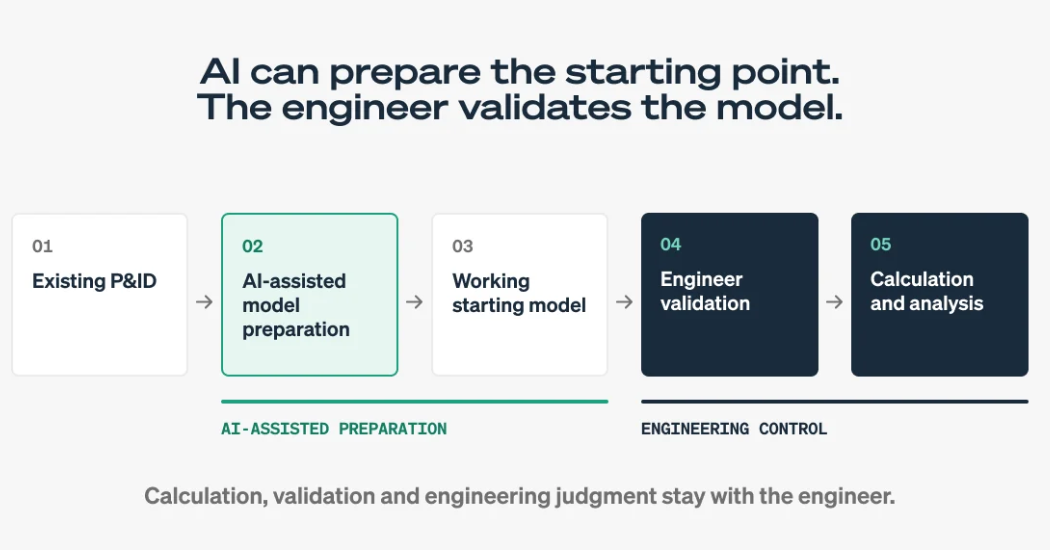
With PIPE-FLO Connect: AI prepares the starting model from the existing P&ID. The engineer validates it, and calculation and engineering judgment remain with the engineer.
Where the boundary sits
AI can help prepare inputs and model structure. The calculation engine, validation, and the engineering decision stay with the engineer. AI has no bearing on the calculation engine or results. Engineering calculations and results remain separate from AI-assisted inputs, and the engineer validates and signs off. Customer data isn’t used to train shared or foundation models.
A clear boundary makes the help easy to use. The engineer can accept a starting model quickly because the review step is defined, and the analysis keeps the authority of the engineer’s own validation.
How PIPE-FLO Connect Applies This
PIPE-FLO Connect applies AI assistance to the move from existing engineering information toward a working model. AI-assisted import helps turn an existing P&ID, diagram, or PDF schematic into a working model. The engineer then reviews and refines it, and the trusted calculation layer runs the analysis. The engineer still reviews and signs off.
Screenshot of the PIPE-FLO Connect interface showing a piping network for a direct primary chilled water system. A “Source information” inset shows a simplified schematic on the left, and a green “Working model” label points to the fully annotated network with flow, pressure, and zone values.
From existing engineering information to a working model in PIPE-FLO Connect.

The full product story is on the PIPE-FLO Connect page.
The Practical Measure
Judge AI in engineering by what it removes. Here, the measure is less about rebuilding existing information and more about a direct path to analysis. Teams that reach the first calculation sooner have more time for the iterations that improve a design.
See This on Your Own P&ID
Bring a diagram from a current or past project and see how it becomes a working model.